



Blog >> Whitepapers >> Wordpress.
워드프레스 redis 캐쉬 적용
캐쉬 적용 프로젝트
1. redis 적용으로 DB 캐쉬 – 드롭 인
2. 페이지 캐쉬 적용 – 드롭 인
wp-config.php 에 define(‘WP_CACHE’, true); 명시해야 함.
캐시가 감지 되지 않는다는 문제는 플러그인을 통해 해결하는 것이 일반적 하지만, 플러그인이 맘에 들지 않음.
직접 Redis (고성능 인 메모리 데이터 저장소) 를 활용하기로 함. 레디스에 대한 자료는 구글링 하면 됨. 설치해서 서버에 활성화가 되었다면, wp-config.php 에 라인 추가. 그리고 wp-content 디렉토리 루트에 드롭 인 방식의 플러그인 object-cache.php 파일 추가.
~]$ vi wp-config.php
... 중략 ...
// redis 캐시 작동 추가
define('WP_CACHE', true);     // 요거는 공통으로 적용
define('WP_USE_REDIS', true); // ← 이걸 먼저 정의
define('WP_REDIS_HOST', '127.0.0.1');
define('WP_REDIS_PORT', 6379);
define('WP_REDIS_PASSWORD', '***********'); // 필요 시 비밀번호 입력
define('WP_REDIS_DATABASE', 0); // 명시적으로 지정
define('WP_REDIS_PREFIX', 'gld_'); // 캐시 키 prefix - 사이트마다 별도로 지정
define('WP_REDIS_MAXTTL', 3600); // 캐시 TTL (초)
define('WP_REDIS_DISABLED', false); // Redis 캐시를 임시로 끄고 싶을 때 true
define('WP_REDIS_GRACEFUL', true);  // Redis 연결 실패 시 사이트가 죽지 않고 fallback 하도록
define('WP_REDIS_SELECTIVE_FLUSH', true); // prefix가 붙은 키만 flush 하도록 제한
... 중략 ...

# redis 캐쉬 적용
~]$ vi wp-content/object-cache.php
<?php

defined( 'ABSPATH' ) || exit;

if ( defined( 'WP_REDIS_DISABLED' ) && WP_REDIS_DISABLED ) {
    return;
}
..... 중략 .....
class WP_Object_Cache {
    private $redis;
    private $connected = false;
    private $fail_gracefully = true;
    private $ignored_groups = []; // 👈 Deprecated 경고 해결: PHP 8.2+에서 동적 속성 생성을 방지합니다.
..... 중략 .....
        $groups = is_array( $groups ) ? $groups : [ $groups ];
        foreach ( $groups as $group ) {
            $this->ignored_groups[] = $group;
        }
    }
}

# 페이지 캐쉬 적용
~]$ mkdir wp-content/cache
~]$ vi wp-content/advanced-cache.php마지막으로 OPCache 관련 이슈는 무시. – 사이트의 규모에 따라 php-fpm 설정에서 선택적으로 활용 하기로 함.
# opcache 디렉토리 위치 확인
~]# vi /etc/php.d/10-opcache.ini
..... 중략 .....
; 2차 캐시 디렉토리를 활성화하고 설정합니다.
; SHM 메모리가 가득 찼을 때, 서버를 다시 시작하거나
; SHM을 재설정할 때 성능이 향상되어야 합니다.
; 기본값 ""은 파일 기반 캐싱을 비활성화합니다.
; RPM 참고: 파일 캐시 디렉토리는 프로세스 소유자가 소유해야 합니다.
; mod_php 의 경우 /etc/httpd/conf.d/php.conf 를 참조
; php-fpm 의 경우 /etc/php-fpm.d/*conf 를 참조
; 전역 전용 기본값 ""
opcache.file_cache=/var/lib/php/opcache
..... 중략 .....

~]# vi /etc/php-fpm.d/enabled/gldigital.co.kr.conf
..... 중략 .....
; opcache 사용여부 on/off
php_admin_flag[opcache.enable] = off
; opcache on 적용 시
;php_admin_value[opcache.memory_consumption] = 128
;php_admin_value[opcache.max_accelerated_files] = 10000
; 개발 코드 수정시 0초 - 바로 확인
; opcache on 적용시 한 2초? 3초?
;php_admin_value[opcache.revalidate_freq] = 0
..... 중략 .....구글 폰트 로딩으로 느려지는 경우도 간간히 있음으로,
구글 폰트 로딩을 하지 않고, 사이트에 저장 된 폰트를 활용한다. 이때 최신 브라우저가 활용하는 woff2 폰트로 대치.
~]$ vi themes/...-child/functions.php
... 중략 ...
/**
 * 외부 구글 폰트(fonts.googleapis.com) 완벽 차단 및 제거
 */

// 1. Brooklyn 및 기본 테마 구글 폰트 핸들 제거
add_action('wp_enqueue_scripts', function () {
    // Brooklyn 테마 / United Themes 및 기본 비상 테마 핸들 지정
    $handles = [
        'open-sans',
        'google-fonts',
        'ut-google-fonts',
        'twentytwentyfive-google-fonts'
    ];

    foreach ($handles as $handle) {
        wp_dequeue_style($handle);
        wp_deregister_style($handle);
    }
}, 999);

// 2. style_loader_tag 단계에서 구글 폰트 link 태그 1차 차단
add_filter('style_loader_tag', function ($html, $handle) {
    return (false !== strpos($html, 'fonts.googleapis.com')) ? '' : $html;
}, 999, 2);

// 3. 최우선 버퍼링(init)을 통해 하드코딩된 <link> 및 @import 구글 폰트 최종 소거
add_action('init', function () {
    if (is_admin() || (defined('WP_CLI') && WP_CLI)) {
        return;
    }

    ob_start(function ($buffer) {
        if (empty($buffer)) {
            return $buffer;
        }

        // <link ... fonts.googleapis.com ... > 태그 및 Preload 전체 치환
        $buffer = preg_replace('/<link[^>]*href=["\'][^"\']*fonts\.googleapis\.com[^"\']*["\'][^>]*>/i', '', $buffer);

        // @import url(...fonts.googleapis.com...) 구문 치환
        $buffer = preg_replace('/@import\s+url\((["\']?)[^)]*fonts\.googleapis\.com[^)]*\1\);?/i', '', $buffer);

        return $buffer;
    });
}, 1);
... 중략 ...

# 이후 woff2 폰트를 차일드 테마 css/fonts 디렉토리로 복사
~]$ vi themes/...-child/style.css
... 중략 ...
@font-face {
    font-display: swap;
    font-family: "Noto Sans Korean";
    font-weight: 400;
    font-style: normal;
    src: local('Noto Sans Regular'), local('NotoSans-Regular'),
         url("css/fonts/NotoSans-Regular.woff2") format("woff2");
}
... 중략 ...
/* 본문 및 기본 요소 */
body, p, input, select, textarea, button {
    font-family: "Noto Sans Korean", -apple-system, BlinkMacSystemFont, sans-serif !important;
}폰트 변환으로 woff2 폰트 만들기
# ttf 파일 하나만 변환할 때
~]$ fonttools ttLib.woff2 compress Raleway-Bold.ttf

# 디렉터리 내 모든 ttf/otf 파일 일괄 변환
~]$ for f in *.[tt][tt][ff] *.[oo][tt][ff]; do fonttools ttLib.woff2 compress "$f"; done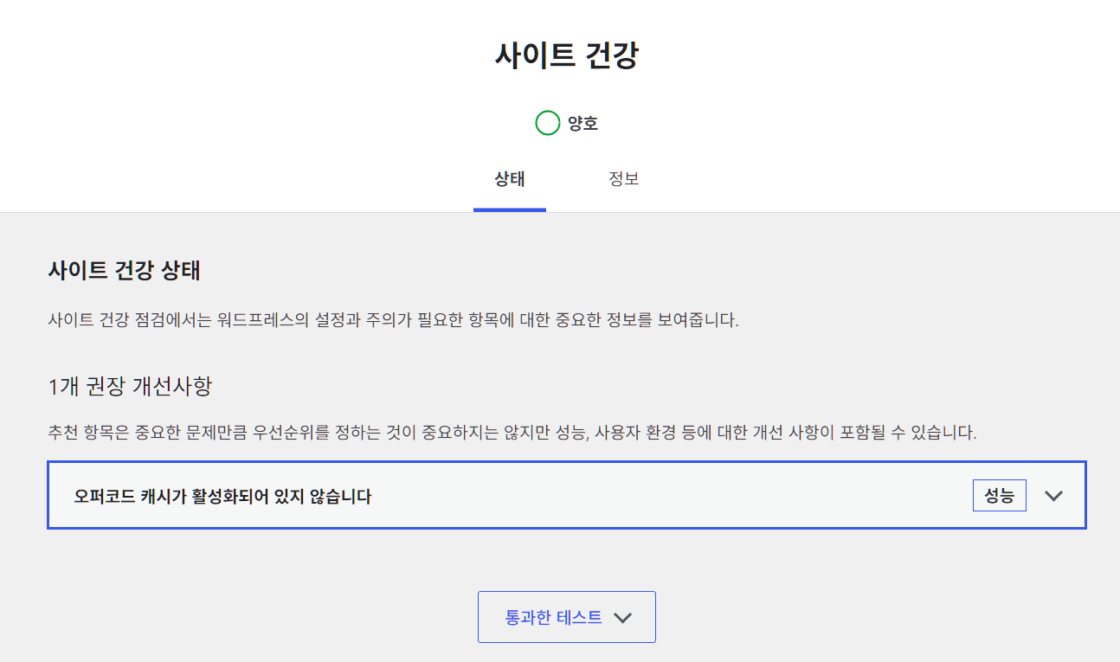
모니터 및 관리
# 모니터
~]# redis-cli -a "비번" monitor | grep --line-buffered "[프리픽스_]"

# 메모리사용량 체크
~]# redis-cli -a "비번" info memory | grep used_memory_human

~]# vi /etc/redis/redis.conf
..중략..
# 메모리 관리
# Redis는 메모리 기반이므로 제한을 설정해야 안정적
# allkeys-lru: 가장 오래 사용되지 않은 키부터 제거
# 워드프레스 캐싱에 적합한 정책
#
maxmemory 256mb
maxmemory-policy allkeys-lru
..중략..

# 서버 내부에서 surfnsnow 로컬 cURL 응답 시간 측정
 ~]# time curl -s -o /dev/null -w "HTTP: %{http_code} | Total Time: %{time_total}s\n" https://surfnsnow.kr/
HTTP: 301 | Total Time: 0.217556s

real    0m0.223s
user    0m0.011s
sys     0m0.005s

# 사이트의 wp-config.php에 아래 설정을 넣어 백그라운드 cURL이 자기 자신을 호출할 때 외부 네임서버/SSL을 거치느라 느려지는 현상을 완화할 수 있다고하지만 별로 유용하지 않음.
// 백그라운드 Loopback cURL 통신 최적화
//define('WP_HTTP_BLOCK_EXTERNAL', true);

# 실제 워드프레스 페이지 응답 속도를 보려면 cURL에 -L (리다이렉트 따라가기) 옵션을 붙여야 함.
 ~]# time curl -s -L -o /dev/null -w "HTTP: %{http_code} | Total Time: %{time_total}s\n" https://surfnsnow.kr/